

The KTC MegPad A25Q5 looks most convincing as a TV replacement for small rooms, close-range viewing, and flexible day-to-day use, not as a full living-room screen.
If you are tired of choosing between a cramped laptop screen and a TV that feels too big or too fixed in place, a 25-inch smart monitor is an easy idea to understand. Category testing from outlets like PCMag, RTINGS, CNET, and Tom’s Hardware shows just how wide the portable display market has become, from roughly 14-inch work screens to 18.5-inch gaming models with up to 300Hz, which makes a larger 25-inch smart format especially relevant for real entertainment use. What matters is knowing where this kind of screen actually works, what compromises matter most, and whether it fits your room better than a standard television.
Where a 25-Inch Smart Monitor Fits Best
A 25-inch portable smart monitor sits in an unusual but useful middle ground. Most portable monitors covered in the research notes range from about 13 inches to 21.5 inches, with many top picks clustering around 14 to 17 inches. That makes a 25-inch model meaningfully larger than the usual travel display and much closer to something you could actually watch at night without feeling like you are staring at an oversized tablet.
That size changes the use case. A normal portable monitor is often bought for a laptop bag, a second screen, or presentations. A 25-inch smart monitor is better understood as a movable personal TV for a bedroom, dorm, studio apartment, kitchen, guest room, or temporary setup. It is large enough to feel relaxing from a bed, couch, or desk chair at close range, but still small enough to move more easily than a conventional television.
Best-case viewing scenarios
The strongest fit is solo viewing or two-person viewing in a compact space. If you are watching from a few feet away, 25 inches can feel practical and focused. If you expect a whole room experience, especially for family movie nights or sports with several people, that is where a traditional TV still has the advantage.
Why the size matters more than the label
The word “portable” can be misleading here. A 14-inch or 15.6-inch portable monitor is about mobility first. A 25-inch portable smart monitor is about flexibility first. The point is not slipping it into a backpack. The point is being able to place it where a fixed TV would be inconvenient, then use it for streaming, console play, and basic monitor duty without dedicating permanent floor or wall space.
Can It Really Replace a TV?
Yes, but only if your idea of a TV is personal, not room-filling. That is the central question for the KTC MegPad A25Q5, and the answer depends less on refresh rate or raw panel bragging rights than on how and where you watch.
A bedroom TV replacement is the clearest win. If your current habit is streaming shows before sleep, watching YouTube while folding laundry, or running a console in a small room, a 25-inch smart monitor can cover that job well. It can also suit dorms and short-term living setups where mounting a TV is impractical or where you want one screen to shift between desk and entertainment use.
Where it beats a standard TV
A smart monitor has an advantage when flexibility matters. You are not locked into one wall, one stand, or one purpose. That matters in apartments, shared rooms, and multipurpose spaces. The smart layer also matters: if the screen can run apps directly, it reduces the need to keep a laptop or streaming stick connected all the time.

Where it falls short
It is still not the best choice for a main household TV. A 25-inch screen is simply not large enough to replace a living-room television for most people in the United States. The viewing distance gets too long, the screen starts to look small, and built-in audio on monitor-style products usually trails even modest TVs.
The Tradeoffs That Matter Most
If the MegPad A25Q5 is being judged as a TV replacement, four factors matter more than gaming specs: brightness, speakers, connectivity, and app experience. Those are the features that determine whether the screen feels convenient every day or turns into a device that constantly needs help from other devices.
Portable monitor testing in the notes supports that priority. CNET measured the 16-inch Arzopa Z1RC at a little over 360 nits despite a higher advertised number, and Tom’s Hardware measured the 16-inch ViewSonic TD1656-2K at 363 nits. That is useful context because brightness claims in this category do not always translate neatly into real-world performance. If you plan to use a 25-inch smart monitor in a bright kitchen or near windows, practical brightness matters more than a spec-sheet headline.
Brightness and room placement
For nighttime viewing or controlled bedroom lighting, moderate brightness can be enough. For daytime use, especially in rooms with strong natural light, brightness becomes one of the first reasons a smart monitor can feel worse than a TV. A screen that looks fine at night can feel washed out by noon.
Sound and why it matters more here
Many portable monitors include speakers, but they are often basic. The research notes mention dual 1-watt speakers on a budget Arzopa model, which is fine for casual use but not a real substitute for fuller TV audio. That matters because a device marketed as a TV replacement has to work well without always needing external speakers. If the KTC is going into a bedroom or dorm, audio quality is not a side issue; it is part of the core buying decision.
Connectivity and smart usability
USB-C and HDMI are standard strengths in the portable monitor category, and that is useful. Notes from CNET, Lenovo, and RTINGS repeatedly highlight USB-C video, power delivery, and HDMI as baseline expectations. For TV replacement duty, though, the more important question is whether the smart interface is smooth enough that you do not always fall back to a laptop, console, or streaming dongle.
Smart Monitor vs. Portable Monitor vs. Small TV
A 25-inch smart monitor is not just a larger portable monitor, and it is not just a smaller TV. It borrows from both categories, which is why it can be either unusually practical or slightly awkward depending on your expectations.
A regular portable monitor usually prioritizes mobility, thinness, and simple wired connections. A small TV prioritizes remote-friendly use, built-in apps, and easier living-room habits. A smart monitor tries to combine those ideas: display flexibility plus app-based entertainment.
When the smart monitor is the better buy
Choose the smart monitor route if you want one screen for streaming, light console use, desk use, and moving between rooms. That is especially true if you do not want to dedicate space to a permanent TV and you care more about versatility than cinematic scale.
When a TV is still the smarter purchase
Choose a TV if you mainly want bigger-screen entertainment from farther away. If the screen will stay in one room, if multiple people watch together often, or if strong built-in sound matters, a traditional television remains the safer choice.
Who Should Actually Buy the KTC MegPad A25Q5?
The best buyer is someone who wants a personal entertainment screen that can do more than one job. Think of the person in a dorm who wants Netflix at night and a larger screen for a laptop during the day. Or the apartment renter who wants a screen in the bedroom now, then on the desk next week, without dealing with a wall mount or buying two separate displays.
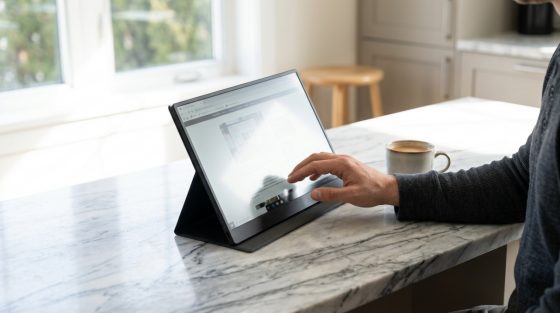
It also makes sense for temporary setups. The research notes show how broad this category has become, from budget 15.6-inch models around $70 to premium touch and 4K options near $700. That range exists because people increasingly want displays that adapt to space limits and mixed use. A 25-inch smart monitor pushes that logic further by making entertainment more comfortable than a typical portable display.
Buyers who will get the most value
People in bedrooms, dorms, kitchens, guest rooms, and small apartments are the best fit. So are users who split time between streaming, casual gaming, and productivity instead of needing best-in-class performance in just one category.
Buyers who should probably skip it
If you are building a serious gaming setup, a dedicated high-refresh monitor is likely better. The notes include 240Hz and 300Hz portable gaming options from ASUS and NexiGo, but that is a different priority set. If your goal is movie nights across the room, a proper TV will also make more sense.
Practical Next Steps
The KTC MegPad A25Q5 makes the strongest case as a flexible small-space screen, not as a universal TV killer. Its 25-inch size is large enough to be more relaxing than a typical portable monitor and more adaptable than a fixed TV, which makes it appealing for close-range entertainment and mixed-use setups.
Before buying, ask three plain questions. Will you usually watch alone or with one other person? Will the screen sit a few feet away instead of across the room? Do you care more about easy streaming, room-to-room flexibility, and compact placement than about big-screen impact? If the answer is yes, a 25-inch smart monitor like the MegPad A25Q5 can absolutely replace a bedroom or dorm TV. If not, it is better treated as a smart secondary screen than a true main television.